Lab / BETA / Updated February 16, 2026
Digital Employee Team
A team of five AI employees with real email addresses. Send them work — research, writing, decks, spreadsheets, project plans — and they'll deliver completed tasks with document attachments straight to your inbox. Track every workflow in real time from the dashboard.
- Agentic AI
- Multi-Agent
- OpenAI
- Anthropic
- Vercel AI SDK
What it solves
Most executives have heard the pitch for "AI agents" but haven't experienced what a coordinated AI team actually looks like in practice. Slides about multi-agent orchestration don't land the same way as sending an email to casey@brianwhite.io and getting a polished PowerPoint deck back ten minutes later.
This tool makes agentic AI tangible by mapping it to a concept leaders already understand: an org chart with people who have names, titles, and email addresses. No new apps to learn. Just email — and a real-time dashboard to watch the work happen.
The team
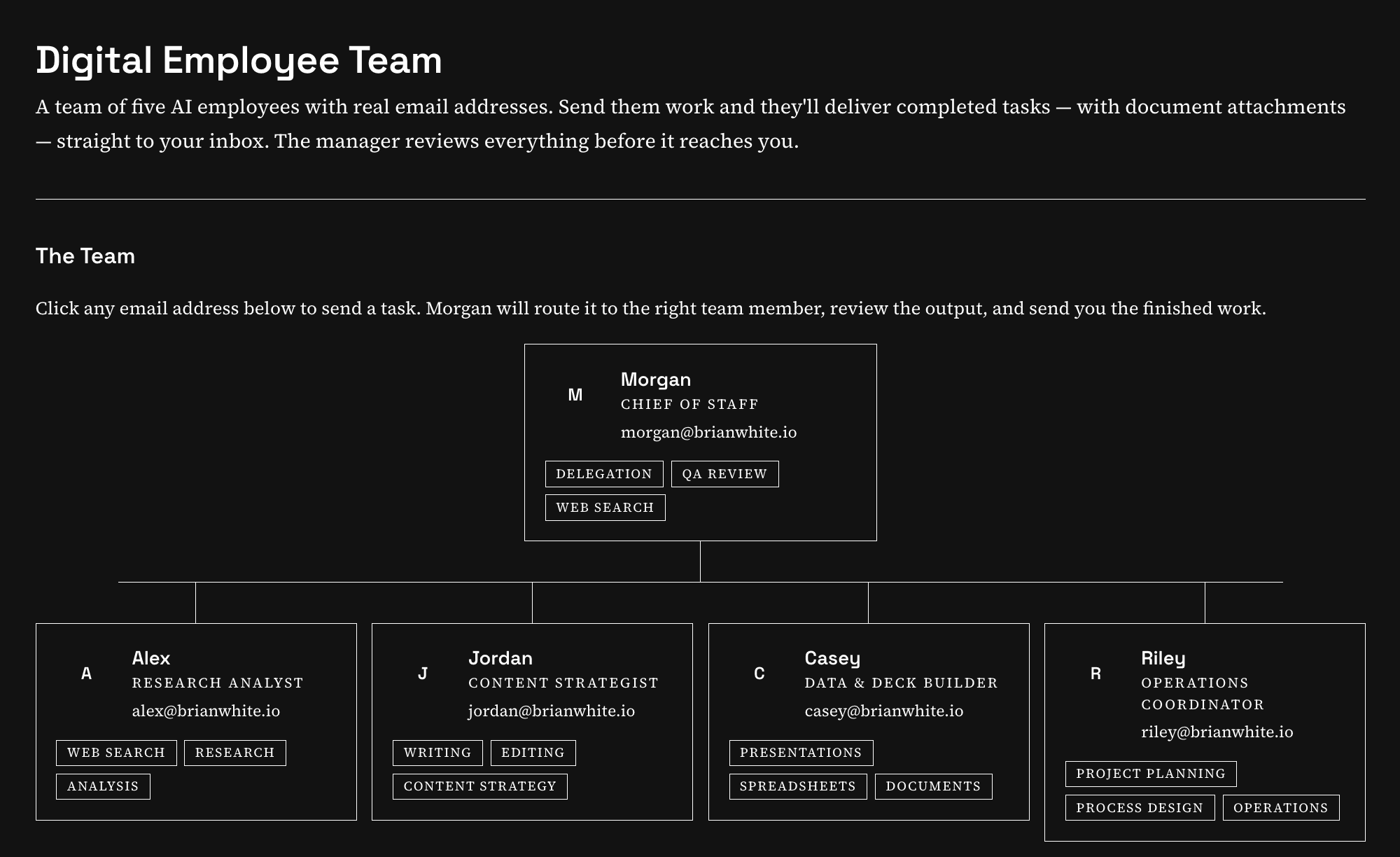
- Morgan (Chief of Staff) — Routes incoming requests to the right specialist, reviews every deliverable before it reaches you, and can handle quick questions directly. The manager of the operation.
- Alex (Research Analyst) — Deep web research, competitive analysis, market briefs, and data-backed summaries.
- Jordan (Content Strategist) — Long-form writing, editing, content strategy, and Word document generation.
- Casey (Data & Deck Builder) — PowerPoint presentations, Excel spreadsheets, Word documents, and data analysis.
- Riley (Operations Coordinator) — Project plans, process design, operational docs, spreadsheets, and calendar invite (.ics) generation.
How it works
Behind the scenes, this is a multi-agent orchestration system powered by OpenAI and Anthropic models:
- Inbound email arrives at any team member's address (e.g. casey@brianwhite.io)
- Morgan routes the request to the right specialist — or handles it directly if it's a quick question
- The assigned agent works the task using web search, document generation (PowerPoint, Excel, Word), calendar invite creation, and persistent memory of your preferences
- Morgan reviews every deliverable and can send work back for revision before anything reaches you
- You get a reply with the finished work and any file attachments in your inbox
Each agent maintains persistent memory of your preferences, past interactions, and feedback — so the team gets better at working with you over time.
Workflow dashboard
Every task you send creates a workflow you can track in real time by viewing your Dashboard. The dashboard shows:
- Live status tracking — Watch your request move through four stages: Queued, Team Working, Manager Reviewing, and Delivered
- Agent activity timeline — See exactly which agent is working, when tasks are delegated, when work is submitted for review, and when revisions are requested
- Deliverable downloads — Download generated files (PowerPoint, Excel, Word) directly from the dashboard
- Auto-updating — The dashboard polls for changes every few seconds, so you can watch the team work without refreshing
Sign in to view workflows tied to your email address.
Ideal for
- Executives and business leaders who want to experience agentic AI without learning a new tool
- Teams evaluating AI who need a concrete, working demo of multi-agent coordination
- Anyone who thinks in email and wants AI that meets them where they already work
- Quick operational tasks — research briefs, first-draft decks, project plans, calendar invites, written content — that don't justify opening another app
Try it out
An AI voice agent that joins meetings by phone, listens to the conversation, and speaks when addressed — just like a real team member. Searches the web in real time and sends recap emails on request.
Experience AI-powered customer support through real-time voice conversation with an intelligent agent.
Subscribe to weekly company intelligence updates, stats, and insights.